
Last updated on
Nov 9, 2026

CA LIC 624 1999-2026 free printable template
pdfFiller is not affiliated with any government organization

Fill out
Complete the form online in a simple drag-and-drop editor.

eSign
Add your legally binding signature or send the form for signing.

Share
Share the form via a link, letting anyone fill it out from any device.

Export
Download, print, email, or move the form to your cloud storage.
Why pdfFiller is the best tool for your documents and forms


End-to-end document management
From editing and signing to collaboration and tracking, pdfFiller has everything you need to get your documents done quickly and efficiently.
Accessible from anywhere
pdfFiller is fully cloud-based. This means you can edit, sign, and share documents from anywhere using your computer, smartphone, or tablet.
Secure and compliant
pdfFiller lets you securely manage documents following global laws like ESIGN, CCPA, and GDPR. It's also HIPAA and SOC 2 compliant.
What is CA LIC 624
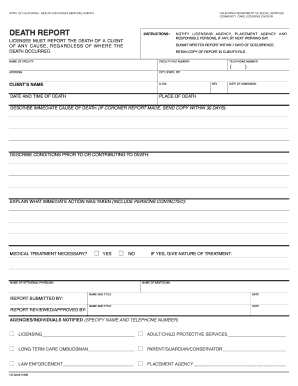
The California Death Report Form is a government document used by licensed facilities to report the death of a client to relevant agencies within 7 days of occurrence.
pdfFiller scores top ratings on review platforms




Who needs CA LIC 624?
Explore how professionals across industries use pdfFiller.

CA LIC 624 is needed by:
-
Licensed facilities in California
-
Healthcare Administrators
-
Funeral Service Providers
-
Legal representatives of deceased clients
-
Agency Compliance Officers
-
Family members needing to notify the facility
Comprehensive Guide to CA LIC 624
What is the California Death Report Form?
The California Death Report Form is a crucial document for licensed facilities in California, serving to report the death of a client to the relevant authorities. This form ensures compliance with state regulations and ultimately safeguards the rights of the deceased and their families. Personal details, cause of death, and actions taken by the facility are included within the required information, which supports legal and health monitoring efforts.
Facilities can download the California Death Report Form PDF to access a blank template for completion.
Purpose and Benefits of the California Death Report Form
The primary purpose of the California client death report is to inform authorities about a death that occurs in a licensed setting within seven days. Timely reporting is essential, as it helps ensure that necessary measures are taken by health officials. This form provides several benefits, including legal protection for the facility, adherence to regulatory compliance, and useful data for health monitoring.
Submitting the report promptly is vital to fulfilling legal obligations and ensuring that the deceased's rights and dignity are respected.
Who Needs the California Death Report Form?
The California Death Report Form primarily serves licensed facilities and the individuals tasked with reviewing the report. Eligibility to file the report is typically limited to the personnel in charge of client care and oversight. Responsibilities in this process vary; while healthcare providers complete the form, report reviewers ensure that submissions conform to state regulations.
Understanding these roles helps streamline the reporting process and fosters accountability among all parties involved.
When to File the California Death Report Form
Filing the California Death Report Form must occur within a specific timeframe, with a strict mandate to submit it within seven days post-client death. Failing to adhere to this deadline can have significant consequences, such as potential penalties or legal repercussions for the facility. Timeliness in submission supports compliance with California regulations and helps maintain accurate health records.
Awareness of the submission timeline is crucial for all licensed facilities.
How to Fill Out the California Death Report Form Online (Step-by-Step)
Filling out the California Death Report Form online can be made simpler with tools like pdfFiller. Here’s a step-by-step guide to ensure accuracy:
-
Access the appropriate California death report template online.
-
Input required information regarding the decedent, including name, date of birth, and cause of death.
-
Complete the facility information fields to confirm the report's origin.
-
Review all fields for accuracy and completeness before proceeding.
-
Save or download the form for submission.
Utilizing pdfFiller aids in creating a seamless filing process with helpful tips for filling out the facility death report form accurately.
Common Errors and How to Avoid Them
When submitting the California Death Report Form, errors can lead to rejections and delays. Common mistakes include omitting mandatory fields or providing inaccurate information. To validate your submission, check for the following:
-
Completeness of all required information.
-
Correctness of client details and cause of death.
-
Signatures of both the facility and report reviewer.
Implementing these best practices enhances your chances of a smooth submission process, avoiding common rejection reasons.
How to Submit the California Death Report Form
Submitting the California Death Report Form can be accomplished through several methods, including online submission, mailing it directly, or delivering it in person to the appropriate authorities. Facilities should verify the specific address for submission to ensure timely processing.
If applicable, be aware of any associated fees and estimated processing times to better plan the filing approach.
What Happens After You Submit the California Death Report Form?
Upon submission of the California Death Report Form, facilities must engage in follow-up actions to confirm the status of their report. It’s essential to check your application status with the relevant agency after a submission. If corrections or amendments are required, understanding the protocol for making these adjustments is crucial.
Security and Compliance for the California Death Report Form
The importance of maintaining security when handling sensitive information during the reporting process cannot be overstated. pdfFiller employs 256-bit encryption and complies with HIPAA and GDPR regulations, ensuring the privacy and data protection of users. Staying compliant with relevant laws is essential when dealing with sensitive documents like the California death report form.
Empowering Your Filing Process with pdfFiller
Leveraging pdfFiller can significantly enhance the efficiency and user-friendliness of your filing experience. The platform offers capabilities such as editing documents, eSigning, and smart form features that are particularly beneficial when completing the California Death Report Form. Using pdfFiller allows for a streamlined process, making the completion of the form more accessible.
How to fill out the CA LIC 624
-
1.Access and open the California Death Report Form on pdfFiller by navigating to the website and searching for the form name in the search bar.
-
2.Once the form loads, familiarize yourself with the layout. Use the toolbar to zoom in or out for easier viewing.
-
3.Gather the necessary information before you begin filling the form. This includes the client's personal information, details about the cause of death, and any notifications that were made.
-
4.Start filling in the required fields, using pdfFiller’s interactive fields. Click on each box to enter the information accurately.
-
5.Use the checkboxes for any relevant options. Review the form's instructions provided at the top of the document for guidance on what information is necessary.
-
6.Once all fields are completed, double-check your entries for accuracy and ensure you’ve signed where necessary.
-
7.After reviewing, you can save your progress on pdfFiller by clicking the save icon. You can also export the document as a PDF.
-
8.To finalize, download the completed form to your device or choose to submit it directly through pdfFiller if submission options are available.

Who is eligible to fill out the California Death Report Form?
The form should be filled out by licensed facilities in California, specifically designated staff like administrators or healthcare providers involved in the death report process.
What is the deadline for submitting the California Death Report Form?
The form must be submitted within 7 days of the client's death to ensure compliance with state regulations.
What methods can I use to submit the California Death Report Form?
You can submit the form electronically via pdfFiller if available, or print and send it by mail to the appropriate agency. Always check submission guidelines.
Are there any supporting documents required when submitting this form?
Generally, no additional documents are required; however, providing a death certificate or relevant medical records may expedite processing in certain cases.
What common mistakes should I avoid when completing this form?
Ensure all required fields are filled out accurately and check your entries before submission. Avoid leaving any mandatory fields blank or providing incorrect details.
How long does it take to process the California Death Report Form?
Processing times can vary but expect a few weeks. Timely submission ensures quicker processing as some discrepancies may lead to delays.
Can I edit the California Death Report Form after submission?
Typically, once submitted, editing the form is not allowed. If mistakes are found post-submission, contact the respective agency for guidance on how to rectify the situation.
Related Content
Related Forms





Get the latest insights from our blog


If you believe that this page should be taken down, please follow our DMCA take down process
here
.
This form may include fields for payment information. Data entered in these fields is not covered by PCI DSS compliance.